
How to Automate signals with Cornix
✅ Prerequisites
Before you begin, make sure you have:
- A Telegram account
- A Cornix account (connected to Telegram)
- An account on a supported exchange (e.g., Binance, Bybit, KuCoin)
- An active GreenCrypto Premium subscription
Step 1: Join the GreenCrypto Premium Telegram Signals Group
- Subscribe to GreenCrypto by contacting us on telegram https://t.me/GreenCryptoSupport
- You will receive an invite link to the Telegram signal group.
- Join the group with your Telegram account.
Step 2: Create a Signals Bot on Cornix
Login to Cornix Dashboard. Click on "Signals Bot" --> "Create Bot", you will see a page similar to this
Click on Advanced Settings
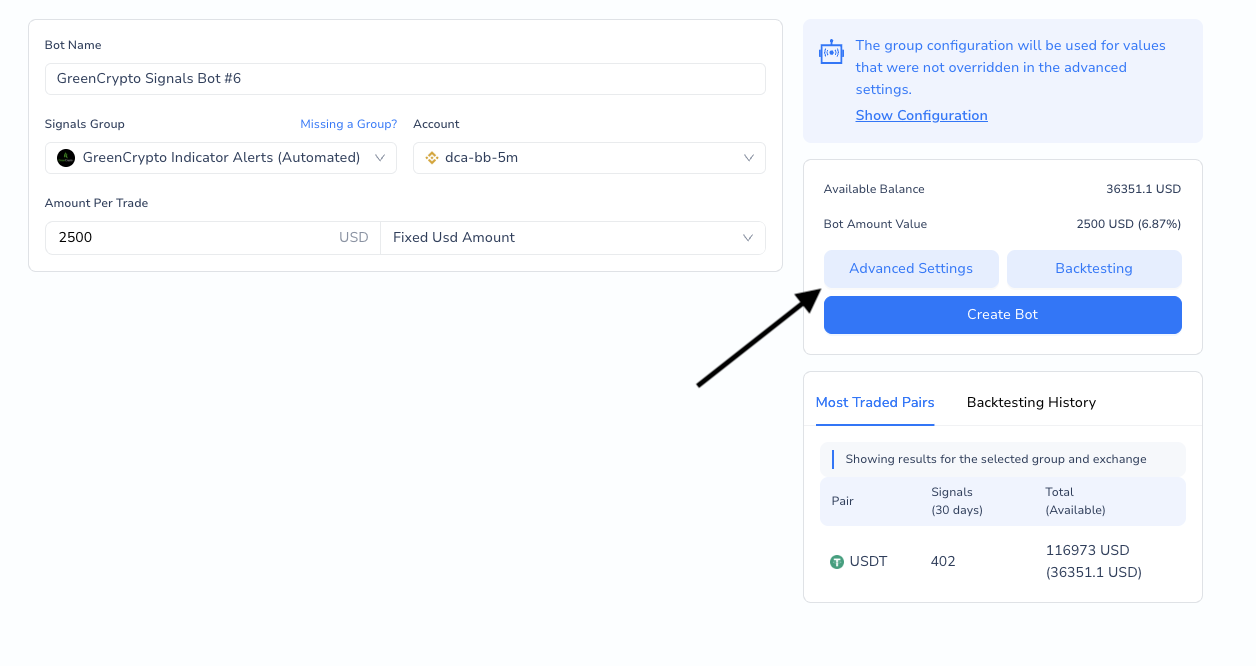
Create Bot Step 1
Update Below Configurations
- Account: <Select the Trading account with Future/Perpetual Trading Enabled
- General --> Amount Per Trade: 0.5-1 - Risk Percentage
- Stop --> Leveraged Trailing --> Personal:
- Type: Moving Target
- Trigger: #1
- Advanced: Close Trade On TP Before Entry --> ON
Click on "Create Bot"
That's all. As the telegram channel recieves new signals, cornix will parse the signals and open a trade automatically on your Account.